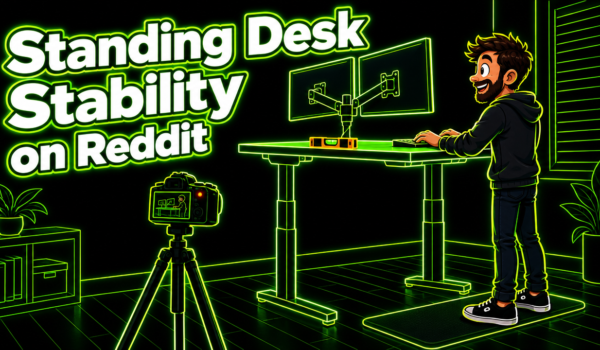
Standing desk brands can demonstrate stability to Reddit buyers by filming the desk under the conditions the buyer described. Set it to the height they use, fit a monitor arm, have someone type normally and keep the camera fixed. Beside the clip, list the desktop size, the monitor weight, the floor surface and the height, so a reader can judge how closely the setup matches theirs. Say that you make the desk, and say what the clip does not establish.
This guide builds a setup card and two replies. The desk, the measurements and the buyer are illustrations. The assembly points come from one manufacturer’s published instructions, and the note on standards comes from ANSI’s overview of office ergonomics standards.
The question buyers ask
“Does this standing desk wobble with a monitor arm at full height? I’m 6’3″ and type hard.”
“Rock solid” is not an answer, and a clip of a bare desk at sitting height is not evidence. Reddit opportunities for Office furniture often come down to whether a brand will show the product in the buyer’s conditions.
Step 1: What movement is the buyer seeing?
Before you film anything, find out what they mean by wobble.
| Ask | Why it matters |
|---|---|
| What height do you stand at, measured to the desktop? | Movement tends to grow as the legs extend |
| What floor is it on? | Carpet and uneven floors change how the feet sit |
| How big is the top, and what is on it? | Load and overhang change how the frame responds |
| Monitor arm or stands? One screen or two? | A long arm can make a small desk movement look large at the screen |
| Front to back, or side to side? | They have different causes and different fixes |
| Are the feet level and the bolts tight? | Assembly problems can look like a design problem |
The last row is worth checking first with an owner who already has the desk. One manufacturer’s assembly and placement instructions show the kind of steps involved: frame screws are started loosely and fully tightened at a later step, the feet have leveling studs to adjust if the desk appears uneven, and after placement the studs are adjusted so the desk is level and does not shift. The same document warns that dragging the desk may pull the frame and screws loose from the desktop. An owner who moved the desk across a room may have a hardware problem.
Step 2: Film the desk under repeatable conditions
Write the setup card first, then film to it.
| Field | Entry (illustrative) |
|---|---|
| Desk and frame | Model name, two-leg frame, frame version |
| Desktop | 60 × 30 inches, 1 inch thick |
| Height filmed | 47 inches to the top of the desktop, and again at 42 inches |
| Floor | Low-pile carpet over concrete |
| Feet and hardware | Leveled with a spirit level shown on camera. Bolts tightened per the instructions. |
| Load | Two 27-inch monitors, 12 lb each, on a dual arm clamped at the rear center. Laptop and keyboard. |
| Action | One person typing a paragraph at normal force, then leaning on the front edge |
| Camera | Fixed on a tripod, side view and front view, uncut |
| Date and who filmed | Date of filming. Filmed by the brand. |
Three choices make the clip credible:
- Do not cut. Show the desk rising to height, the level on the top and the typing in one take.
- Fix the camera. A handheld shot hides or exaggerates motion.
- Give the viewer a reference. A glass of water on the desktop and a mark on the wall behind the monitor edge both make movement visible.
Film the height buyers ask about, including full extension if that is the question. If the desk moves visibly there, the clip should show it.
Step 3: Explain what the demonstration establishes
A clip like this shows how one desk behaved with one load on one floor. Say so beside it.
| The clip shows | The clip does not show |
|---|---|
| Visible movement at the stated height, load and floor | Behavior with a heavier load, a larger top or a different floor |
| Whether the screens move more than the desktop | Long-term durability |
| That the feet were level and the hardware tight | Compliance with any furniture standard |
Separate the screens from the frame in what you say. If the desktop barely moves and the monitors sway, the arm is amplifying the motion, and a shorter arm extension or a stand may help more than a different desk.
Do not present a typing clip as a standards claim. ANSI’s overview of office ergonomics standards lists a group of ANSI/BIFMA standards that contain requirements for the safety, durability and structural adequacy of furniture products. Claims of that kind rest on formal testing to those documents. If your desk has been tested, name the standard and the test report. If it has not, say that the clip is a practical demonstration.
A reply with a matching clip
I work at [brand]. We filmed this at 47 inches, which is about where a 6’3″ person stands, on low-pile carpet with two 27-inch monitors on a dual arm and someone typing: [link if allowed]. One uncut take, camera on a tripod. You’ll see the desktop move slightly front to back when he leans on the edge, and the monitors move more than the desk because of the arm. Setup details are under the video. If you’re on thick carpet or have a bigger top, your result may differ, and I’d rather you know that before ordering.
A reply when your setup does not match
I work at [brand]. We haven’t filmed that exact setup. Our clip is two monitors on a 60-inch top, and you’ve got an ultrawide on a 72. I won’t tell you it’ll be the same. If you already own the desk, check that the feet are level and the frame bolts are tight first, since that’s the most common fix we see in support. If you’re still deciding, tell me your height and floor and I’ll ask the team to film it.
Owners will also post their own clips. Ask permission before you reuse one. Our guide to Reddit UGC covers how brands can use customer content with consent.
Publish the same conditions on the store page
Put the clip and the setup card on the product page, next to any stability claim. Add a short “check these first” list for owners: level the feet, tighten the hardware, check the arm clamp. Then your Reddit replies and your store say the same thing.
Where to find these questions
Search desk and home office communities for your model names with “wobble”, “at full height”, “monitor arm” and “shake when typing”. The guide to Reddit keyword research shows how to gather the wording buyers use. Check each community’s rules on brand replies and links.
How to measure it
- Show the clip and card to someone outside the company. Ask whether the trial resembles their workspace and what they would change to test their own. If they cannot say, add a field.
- Count replies where you had a matching clip and replies where you did not. Film the missing setups.
- Track returns that cite stability, before and after the card is on the store page.
- Log owner clips that contradict yours and what differed in their setup.
Frequently asked questions
Should we film a competitor’s desk beside ours?
Only under the same card, with both assembled per their instructions, and with the comparison disclosed as yours. A reader will ask who set up the other desk.
What if our desk moves more than we would like at full height?
Show it and say who the desk suits. A tall buyer who learns it from your clip can choose a different frame. One who learns it at home may return the desk and post about it.
Is a wobble measurement in millimeters better than a video?
A number helps if you state how it was measured. Buyers often still want to see the screens while someone types.
Next step
Film your best-selling configuration at two heights this week and publish the card. Buyers weighing a desk often weigh a chair too. See how office furniture dealers can answer refurbished versus new comparisons.
To find Reddit threads where buyers compare office furniture, run the free Reddit Opportunity Report on your website.