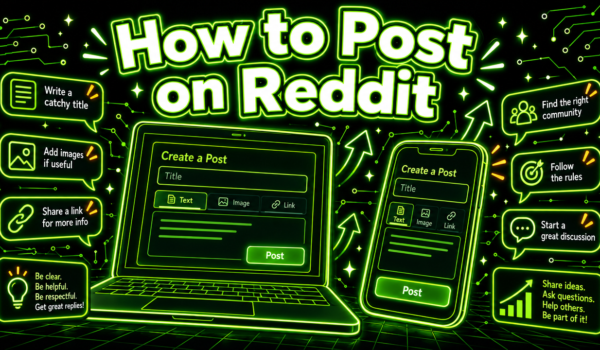
To post on Reddit, open the subreddit you want to post in, select Create Post (the plus icon in the app), choose a post type, write a title of up to 300 characters, add your text, link or media, pick a flair if the community asks for one, then select Post. Before you do, read the subreddit’s rules, because most removed posts break a rule the poster never read.
That covers how to post on Reddit in a few lines. This guide goes step by step for desktop and the mobile app, explains each post type, and covers what trips up new accounts: karma limits, flair requirements and AutoModerator filters. If you are posting for a business, there is a section on that too.

Before you learn how to post on Reddit: three quick checks
A minute of preparation saves most first posts from removal. It also makes the rest of this guide on how to post on Reddit far more useful.
- Find the right community. Search Reddit for your topic and pick a subreddit where similar posts get replies. A small, active community usually beats a huge one where posts sink in minutes.
- Read the rules. On desktop they sit in the sidebar; in the app, open the community and tap its About or info section. Look for rules on self-promotion, required flair, title formats and minimum karma. Our guide to subreddit rules shows where to find them and what common rules mean.
- Look at the top posts. Sort by Top for the past month and read a few. They show you the tone, length and format the community rewards.
How to post on Reddit on desktop
The steps below follow the current desktop layout. Reddit moves buttons around now and then, but the order stays the same.
1. Go to the subreddit
Type the community name in the search bar, for example r/smallbusiness, and open it. Posting from inside the subreddit fills in the community for you.
2. Select Create Post
Select the Create Post button near the top of the community page. You can also use Create in the top bar, then choose the community from the dropdown.
3. Choose a post type
Pick the tab that matches what you are sharing: text, images and video, a link, or a poll where the community allows it. Each type is explained below.
4. Write the title
Reddit titles can be up to 300 characters, but shorter, specific titles get more replies. Say what the post is about in plain words, and follow any title format the rules require, such as a tag in brackets at the start.
5. Add the body
Write your text, paste your link or upload your image or video. In text posts you can format with the editor’s buttons or switch to Markdown mode. Break long posts into short paragraphs and put the main question or point first.
6. Add flair and tags
Many subreddits require a post flair, a label like “Question”, “Discussion” or “Advice”. If the Post button stays grey, a missing flair is the usual reason. You can also mark a post as a spoiler or as not safe for work where that applies. Our guide to Reddit flair explains the options.
7. Select Post
Review the preview, then select Post. Keep the page open for a few minutes and check that the post appears in the community’s New feed. If it does not, see the troubleshooting section below.
How to post on Reddit in the mobile app
How to post on Reddit from a phone follows the same order with different buttons.
- Open the Reddit app and go to the community you want to post in.
- Tap the Create button, a plus icon in the bottom bar or on the community page.
- Confirm the community at the top of the screen, or tap it to choose another.
- Choose the post type using the icons for text, image, video, link or poll.
- Add a title and body, then tap the flair option if the community requires it.
- Tap Post.
If you cannot find the Create button, update the app. Older versions put it in different places, and the help threads that rank on Google for this question often describe an old layout.
Reddit post types explained
| Post type | What it is | Use it for |
|---|---|---|
| Text | A title and a written body | Questions, stories, advice and discussions |
| Images and video | Uploaded photos, GIFs or videos, with a title | Before-and-after photos, demos and visual results |
| Link | A title and a URL to an outside page | Articles and resources, where the rules allow links |
| Poll | A question with set answers people vote on | Quick opinion checks, where the community allows polls |
| Crosspost | Sharing an existing post into another community | Content that suits more than one subreddit |
Not every community allows every type. Some are text-only; some ban links. The Create Post screen only shows the types that community allows.

Why can’t I post on Reddit?
New accounts hit the same handful of problems. This is how to post on Reddit when something gets in the way:
- Minimum karma or account age. Many subreddits only accept posts from accounts with some karma or a few days of history. Comment helpfully in a few communities first. Our guide to Reddit karma explains how it works.
- Missing flair. If the Post button is greyed out, check whether flair is required.
- Restricted community. Some subreddits only let approved users post. The rules usually say how to request access.
- Email not verified. Some communities require a verified email. Check your account settings.
- Rate limits. Reddit may slow down very new accounts that post or comment a lot in a short time.
My post disappeared: what happened?
If your post does not show up in the community’s New feed, it was probably removed or held for review. Reddit filters posts at several layers: sitewide spam filters, AutoModerator rules set by each subreddit, human moderators and Reddit’s admins. AutoModerator catches the most new posts, often for low karma, banned words or links.
Check your profile to see whether the post is visible there, look for a message from the moderators, and reread the rules. If you think the removal was a mistake, message the moderators politely through the community’s Message the Mods option. Do not repost the same thing right away. Our guide on why Reddit posts get removed walks through each cause and how to fix it.
How to write a Reddit post people reply to
Knowing how to post on Reddit gets your post live. Writing it well gets it answered. A few habits help in almost every community:
- Put the question in the title. “Is a 3-year warranty worth it on a commercial espresso machine?” beats “Advice needed”.
- Give context fast. Two or three sentences on your situation help people give useful answers.
- Be specific. Numbers, constraints and what you have already tried attract better replies.
- Keep it readable. Short paragraphs, a bulleted list where it helps, no walls of text.
- Reply to comments. Posters who answer follow-up questions get more help and more goodwill.
- Thank people and update. An edit saying what you decided is a nice touch and helps the next person who finds the thread.
How to format a Reddit post
Reddit’s editor has buttons for bold, italics, links, lists and quotes. If you prefer typing, switch the editor to Markdown mode and use these:
| You type | You get |
|---|---|
| **bold text** | Bold text |
| *italic text* | Italic text |
| [link text](https://example.com) | A clickable link |
| – item | A bulleted list item |
| 1. item | A numbered list item |
| > quoted text | A quote block |
| >!spoiler!< | Hidden spoiler text |
Leave a blank line between paragraphs, or Reddit may run them together. Formatting is part of how to post on Reddit well: a clean, scannable post gets read, and a dense block of text gets skipped.
Reddit etiquette for first-time posters
Reddit publishes a set of community norms called Reddiquette, and every account has to follow the sitewide Reddit Content Policy. In practice, a few habits matter most:
- Search before you post. Many questions have been answered in the same community, and repeat questions get pointed to old threads.
- Use descriptive titles instead of “Help!” or “Quick question”.
- Vote on content based on whether it adds to the discussion, not whether you agree with it.
- Do not ask for upvotes or coordinate voting with others. Reddit treats vote manipulation as a serious violation.
- Credit sources when you share someone else’s work.
- Stay civil in replies, even when someone is rude.
A first-post checklist
Run through this list each time until it becomes habit. It is the short version of how to post on Reddit without problems:
- The community is active and on topic for your post.
- You have read the rules, including self-promotion and flair rules.
- Your account meets any karma or age requirement.
- The title says exactly what the post is about.
- The first lines of the body give the key context.
- Links are allowed, and you have explained why yours is worth clicking.
- You have added any required flair.
- You will be around for the next hour to reply to comments.
Common mistakes on a first Reddit post
- Posting in the biggest subreddit you can find. Large communities have strict filters and fast-moving feeds. A focused, mid-sized community usually gives a first post a better chance.
- Dropping a link and leaving. Link-only posts from new accounts are a common spam pattern and get removed quickly.
- Vague titles. People decide whether to open a post from the title alone.
- Ignoring the rules sidebar. The rule you skipped is usually the one AutoModerator enforces.
- Arguing in the comments. A defensive reply can sink a good post. Thank people for corrections and move on.
- Reposting after a removal. Posting the same thing again without fixing the cause can lead to a ban.
What to do after you post
The first hour matters. Posts that get early replies are more likely to be seen, and replies from the poster keep the discussion going.
- Check the community’s New feed to confirm the post is visible.
- Answer the first comments quickly, even with a short “thanks, that helps”.
- Answer follow-up questions with details, not just “see above”.
- If you get a useful answer, edit the post with a short update so later readers can find it.
- Upvote helpful replies. It costs nothing and helps the best answers rise.
Over time, these habits build karma and a post history that makes moderators and readers trust you, which makes every later post easier.
That is the part of how to post on Reddit that no button teaches: the community remembers who shows up to answer, and a poster who stays to help is welcomed back the next time, while one who posts and vanishes is quickly forgotten.
How to post on Reddit as a business
Businesses can post on Reddit, but the bar is higher. Reddit users dislike posts that read like ads, and most communities limit self-promotion. A few rules keep a business account on the right side:
- Lead with value. Share something useful on its own: a guide, data, a lesson learned. The product can come up if people ask.
- Disclose who you are. If you mention your own company, say so. Hidden promotion gets found out and remembered.
- Follow each subreddit’s self-promotion rules. Some allow it on certain days, some only in a weekly thread, some never.
- Comment more than you post. Answering questions in threads that already exist often builds more visibility than starting new ones.
Our guides to Reddit’s self-promotion rules, posts vs comments and using Reddit for business cover this in more depth.
There is another reason to get this right. Reddit threads often rank on Google for buying questions, and AI tools such as ChatGPT, Perplexity and Google’s AI features frequently draw on those threads when people ask for recommendations. A helpful post or comment from your business in a thread that ranks can keep being seen, and quoted, long after you write it.
Text, link or image: which post type works best?
It depends on the community and the goal. Text posts suit questions and discussions and are allowed almost everywhere. Image posts do well in visual communities such as design, food, home improvement and hobbies, where a photo shows the result better than words. Link posts are the most restricted, because many communities associate outside links with spam, so check the rules first and add a short comment explaining why the link is worth reading.
If you are unsure, start with a text post. It is the format least likely to be removed, and it invites the replies that build an account’s history.
How often should you post on Reddit?
There is no sitewide limit for established accounts, but communities notice frequent posters. A good rule for anyone learning how to post on Reddit is to comment several times for every post you make, and to space posts in the same subreddit by at least a few days. New accounts should spend their first week or two mostly commenting. Our Reddit warm-up guide lays out a simple first-month routine.
Frequently asked questions
How do I make a post on Reddit?
Open the community you want to post in, select Create Post or the plus icon in the app, choose a post type, add a title and your content, choose a flair if required, and select Post.
Why is my Reddit post not showing up?
It may have been removed by AutoModerator or a moderator, or held for review. Common causes are low karma, a new account, a missing flair or a rule about links or self-promotion.
How long can a Reddit title be?
Up to 300 characters. Shorter, specific titles tend to get more replies.
Can I post on Reddit without karma?
In many communities, yes. Others set a minimum karma or account age. Build some karma by commenting helpfully before posting in stricter subreddits.
Can I edit a Reddit post after posting?
You can edit the body of a text post, but not the title. To change a title, delete the post and post again, which some communities discourage, so get the title right first.
How do I post a picture on Reddit?
Choose the images and video post type, upload your file, add a title and select Post. Some communities only allow images in certain flairs or on certain days.
How do I delete a Reddit post?
Open the post, select the three-dot menu and choose Delete. Deleted posts show as removed by the author, and comments under them stay visible unless their authors delete them too.
What is the best way to learn how to post on Reddit?
Pick one or two communities you care about, read their top posts for a week, comment on a few threads, then write your first post following the checklist above. Communities are more forgiving of a new poster who has clearly read the room. If a thread uses terms you do not know, our guide to what OP means on Reddit covers the common ones.
Is it OK to post the same thing in several subreddits?
Use the crosspost option sparingly and only where the content fits each community. Posting identical content in many subreddits at once often gets flagged as spam.
Want to see where your customers are already asking? Get a free Reddit Opportunity Report showing which Reddit threads already rank for your keywords.