Google AI Mode is a conversational search experience inside Google Search. Instead of a list of blue links, it answers with a written response, shows links to supporting pages, and lets people ask follow-up questions. To rank in Google AI Mode, your page needs to be indexed and eligible to appear in Google Search with a snippet, and it needs to be one of the best answers to the many related searches Google runs behind the scenes for each question. There is no separate submission process. Strong, specific, well-organized content that already performs in Google Search is the foundation.
This guide explains how Google AI Mode chooses sources, what query fan-out means for your content, and the practical steps that improve your chances of being linked.

What Google AI Mode is
Google AI Mode is a tab and experience within Google Search, built on Google’s Gemini models. People use it for longer, more complex questions, such as comparing options, planning a trip or understanding a topic in depth. The answer includes links to web pages, and users can keep the conversation going with follow-ups. It differs from AI Overviews, which appear at the top of regular search results for some queries. Both draw on Google’s search index. Our guide on how to appear in Google AI Overviews covers the other feature.
How Google AI Mode picks sources
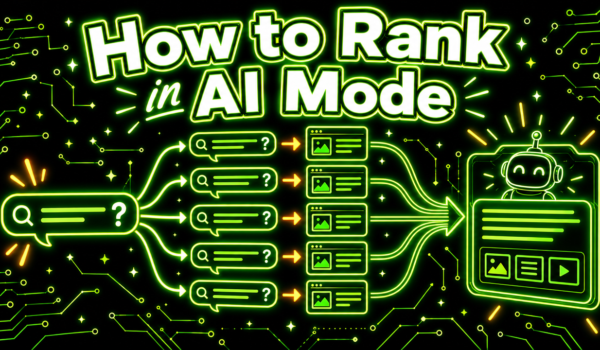
Google explains in its documentation for site owners that AI Overviews and Google AI Mode may use a technique called query fan-out. Instead of running one search for the user’s question, the system issues multiple related searches across subtopics and data sources, then uses the results to build its response. The answer links to pages that support it.
That has a big implication. Your page does not need to rank first for the exact question a user types. It needs to be a strong result for one of the sub-questions the system generates. A question like “what is the best project management tool for a small design agency” might fan out into searches about features for design teams, pricing for small teams, client collaboration, and reviews from agencies. Pages that answer those sub-questions well become candidates for links.
Google has also said that pages must be indexed and eligible to show in Search with a snippet to appear as supporting links. There are no extra technical requirements, and no special markup is needed. Google’s guide to AI features and your website is the official reference.
How to rank in Google AI Mode
Make sure Google can crawl, index and snippet your pages
Check that important pages are indexed in Google Search Console, are not blocked by robots.txt, and do not use nosnippet directives that prevent snippets. Google AI Mode is part of Google Search, so it follows Googlebot rules. Blocking Googlebot removes you from AI Mode and from regular search.
Cover the topic, not just the keyword
Because of query fan-out, a single question touches many subtopics. Build content that covers the full set of questions around a topic: definitions, comparisons, costs, steps, pros and cons, and use cases. A cluster of focused pages that link to each other often does better than one thin page targeting a single phrase.
Answer sub-questions clearly
Use headings that match real questions, and answer each one directly in the first sentence or two under the heading. Clear, self-contained passages are easier for Google AI Mode to use as supporting evidence.
Add specifics
Numbers, examples, comparisons and first-hand experience make a page more useful as a source than generic copy. If you tested something, show what you found. If you sell something, explain who it suits and who it does not.
Show expertise and trust
Google’s long-standing guidance on helpful, people-first content applies. Clear authorship, accurate information, cited sources and a good reputation across the web all support your pages in Google AI Mode just as they do in regular search.
Keep content fresh
For topics that change, update pages with current information and show the update date. Stale pages lose ground when newer, more accurate sources exist.
Follow-up questions change the game

People often ask several follow-ups in Google AI Mode. A first question about the best running shoes for flat feet might lead to questions about cushioning, price, sizing and returns. Each follow-up triggers new searches. Brands that cover the whole journey, from first question to final decision, have more chances to appear across the conversation. Map the follow-up questions your buyers ask, using sales calls, support tickets and community threads, and make sure your content answers them.
The role of third-party sources
Google AI Mode does not only link to brand websites. Review sites, publications, forums and community discussions such as Reddit threads frequently appear among supporting links, especially for recommendation questions. If your brand is discussed positively in those sources, it is more likely to be mentioned in the answer even when your own site is not linked. Our guide to Reddit AI search explains why community content shows up so often.
Measuring Google AI Mode performance

Clicks from Google AI Mode count as Google organic search traffic, so they appear in Search Console and analytics alongside regular search clicks rather than as a separate source. To understand your presence, combine Search Console trends with manual checks: ask Google AI Mode the questions your buyers ask and note whether your pages are linked or your brand is mentioned. Track the same prompts monthly. Our guide to AI share of voice shows how to compare yourself with competitors.
Google AI Mode vs AI Overviews vs classic results
| Feature | Classic results | AI Overviews | Google AI Mode |
|---|---|---|---|
| Format | List of links | AI summary above results | Full conversational answer |
| Follow-ups | New search | Limited | Built in |
| Fan-out | No | May be used | May be used, often extensively |
| Eligibility | Indexed pages | Indexed and snippet-eligible pages | Indexed and snippet-eligible pages |
| Reporting | Search Console | Within Search Console totals | Within Search Console totals |
Building topic clusters for fan-out
A topic cluster is a group of pages that together cover a subject in depth, with a main guide linking to focused pages on each subtopic. Clusters fit fan-out well, because each related search the system runs has a matching page to find.
Imagine a company that sells accounting software for freelancers. A strong cluster might include:
- A main guide to accounting for freelancers.
- Pages on invoicing, tracking expenses, estimated taxes and choosing a business structure.
- Comparison pages for the main accounting tools freelancers consider.
- Pages for specific situations, such as international clients, multiple currencies or seasonal income.
- A pricing page that explains plans in plain language.
When someone asks a complex question in AI Mode, the fan-out searches have a good chance of landing on one or more of these pages. Internal links between them help search engines understand how they relate.
Content types that tend to be linked
- Clear explainers that define a concept and show how it works in practice.
- Comparisons that set out differences between options in a table or list.
- Step-by-step guides with numbered instructions.
- Pages with original data, tests or first-hand experience.
- Product and service pages with specific details, such as features, limits and price ranges.
- Reviews and community discussions, for recommendation questions.
Local businesses and AI Mode
For local questions, AI Mode can draw on business information Google already holds, including listings and reviews. A complete, accurate Google Business Profile, consistent details across directories, and detailed reviews give the system what it needs to recommend a business for a specific request. Service and location pages on your site add depth for follow-up questions about prices, availability and specialties.
Ecommerce and AI Mode
Shopping questions often involve comparisons, constraints and follow-ups about price, size or compatibility. Product pages with full specifications, honest pros and cons, and clear return and shipping information help. Product data in Google Merchant Center can also feed Google’s shopping experiences. Reviews and buyer discussions play a large role in which products get named.
A worked example
Suppose a buyer asks: “What is the best standing desk for a small home office under a tight budget, and is assembly hard?” The system might run searches about compact standing desks, budget options, assembly difficulty, stability at standing height and reviews. A desk maker with a compact model page, a clear assembly guide with time estimates, and genuine reviews mentioning stability would have pages matching several of those searches. A competitor with only a generic product page would match fewer.
The lesson: think about the questions behind the question, and make sure your site answers them.
How to audit your pages for AI Mode
- List your ten most important buyer questions.
- Write down the sub-questions each one implies, the kind fan-out would explore.
- For each sub-question, find the page on your site that answers it best, or note the gap.
- Check that each page answers its question directly, with specifics, near the top.
- Run the main questions in AI Mode and record which sources are linked.
- Compare those sources with your pages, and note what they do better.
- Plan new pages and updates based on the gaps.
Writing passages that work as supporting evidence
Answers in AI Mode are built from passages, not whole pages. A passage that stands on its own, with the question implied by the heading and a complete answer below, is easier to use as evidence than a paragraph that depends on context from earlier in the article.
Some practical habits help:
- Restate the subject in the first sentence of each section instead of starting with “it” or “this”.
- Keep each section focused on one question.
- Put conditions and exceptions next to the claim they qualify, not in a distant footnote.
- Use lists and tables for comparisons and steps, since they summarize cleanly.
- Keep paragraphs short enough that one idea fits in each.
These habits also make pages easier for people to scan, which helps regular search performance too.
Reputation beyond your site
Google’s systems look at signals of trust across the web, and recommendation answers often summarize what multiple independent sources say. Brands that appear in respected publications, earn detailed reviews and get discussed positively in communities have more supporting evidence for the system to draw on. Work on those sources alongside your own pages:
- Pitch useful data or expert commentary to trade publications in your field.
- Keep review profiles active and respond to feedback.
- Participate in good faith in community discussions where your buyers ask questions.
- Get listed in reputable directories and comparison sites for your category.
What not to expect
AI answers vary between users, sessions and over time, and the set of linked pages can change quickly as Google updates its systems. No tactic guarantees a link for a particular question. Treat optimization as raising your odds across many questions, and judge progress by trends over months, such as more appearances across your prompt list and more organic clicks to your key pages, rather than by a single result.
Common mistakes
- Chasing tricks or special markup that Google says is not needed.
- Publishing thin pages that target one phrase with little substance.
- Blocking snippets, which can remove pages from AI features entirely.
- Ignoring the third-party sources that shape recommendation answers.
- Measuring only rankings for head terms, when fan-out favors depth across subtopics.
For broader context on optimizing for AI answers, see our guides to AI search optimization and AI answer engines.
A simple starting plan
If you are starting from scratch, a short plan gets you moving without overthinking it:
- Fix indexing and snippet issues on your most important pages.
- Pick one core topic and build a small cluster of pages that answer its main sub-questions.
- Rewrite the opening of each page so the answer comes first.
- Add a comparison table or step list where it helps readers decide.
- Improve one third-party source each month, such as a review profile or a directory listing.
- Run your prompt list monthly and adjust based on which sources appear.
After three months, review what changed. Expand the cluster approach to your next topic once you see which page types earn links.
Keep a simple log of each change you make and the date, next to your monthly prompt results. When your pages start appearing in Google AI Mode answers more often, the log shows which changes likely helped, so you can repeat them on other topics instead of guessing.
Share the log with writers and editors too. Seeing which pages started earning links makes the guidelines in this article concrete for the people who write your content every week.
Google AI Mode FAQ
How do I rank in Google AI Mode?
Make sure your pages are indexed and snippet-eligible, cover topics in depth, answer sub-questions clearly with specifics, and build a strong reputation in third-party sources.
Is there special markup for Google AI Mode?
No. Google says no special markup or files are required. Standard SEO best practices apply.
What is query fan-out?
It is a technique where Google runs multiple related searches across subtopics for one question, then builds an answer from the results.
Can I opt out of Google AI Mode?
Google AI Mode is part of Search. Snippet controls such as nosnippet affect whether your content can be shown, but they also affect regular search snippets.
Does Google AI Mode traffic show in Search Console?
Clicks and impressions from Google’s AI features are included in Search Console’s search performance data rather than reported as a separate source.
Is Google AI Mode different from AI Overviews?
Yes. AI Overviews appear on regular results pages, while Google AI Mode is a dedicated conversational experience with follow-up questions.
Do I need to rank on page one to be linked in AI Mode?
Not necessarily for the exact question, since fan-out runs many related searches. Strong rankings for the subtopics behind a question improve your chances.
Does page speed matter?
Fast, accessible pages help with crawling and with users who click through. Speed alone will not earn links, but slow or broken pages work against you.
Should I write separate pages for AI Mode?
No. Write for people, cover topics thoroughly and answer questions clearly. The same pages serve regular search, AI Overviews and AI Mode.
Are YouTube videos used in AI Mode answers?
Google’s AI features can include different content types, including video, when they help answer a question. Clear, well-described videos on YouTube can add another way to appear.
How often should I check my visibility?
Monthly checks of a fixed prompt list work for most teams, with weekly checks during launches or major site changes.
Want to see where your customers are already asking? Get a free Reddit Opportunity Report showing which Reddit threads already rank for your keywords.